Quantum


This is the documentation for Quantum, my personnal Discord bot
It has integration for
You can find here a list of available commands and feature
Alongside some insight into the internals (in Rust !)
Discord bot
Commands
Events
guild_member_addition
Add the role @member to any new user
use crate::discord::{Handler, ids, utils};
use poise::serenity_prelude as serenity;
use serenity::async_trait;

#[async_trait]
impl serenity::EventHandler for Handler {
    async fn guild_member_addition(
        &self,
        ctx: serenity::Context,
        new_member: serenity::Member,
    ) {
        let role = serenity::RoleId::from(ids::MEMBER_ROLE);
        let _ = new_member.add_role(&ctx, role).await;

        let msg = format!("Given role <@&{}> to {}", role, new_member);

        utils::log_to_discord(&ctx, msg, utils::LogRole::Info).await;
    }
}
Timers
Livestream monitoring
@1min -> For livestream monitored (see ytb monitor), update the managed event
no source code yet
ping
Show the time spent waiting for the message to be sent
Usage
/ping
Source code
use crate::discord::{Context, Error};

/// Display the latency of the bot
#[poise::command(slash_command, rename = "ping")]
pub async fn cmd(ctx: Context<'_>) -> Result<(), Error> {
    let text = format!("⌛ Loading...");

    // Discord ping
    let start = std::time::Instant::now();
    let discord_response = ctx.say(text).await?;
    let elapsed = start.elapsed();
    let discord_status = format!("Discord Websocket ⇒ `{}ms`", elapsed.as_millis());

    // Send msg
    let msg = poise::CreateReply::default().content(format!("{}", discord_status));

    discord_response.edit(ctx, msg).await?;

    Ok(())
}
archive
Export all the messages from a channel to a text file
Usage
/archive channel=...
| Argument | Description | Exemple |
|---|---|---|
| channel | Channel to archive | #general-chat |
Source code
none yet
ytb post
Post a video/stream in an announcement channel
Usage
/ytb post type=... url=...
| Argument | Description | Exemple |
|---|---|---|
| type | Type of message to send | Video or Stream |
| url | URL of any YouTube video | https://youtu.be/S37C2SQb6qQ |
Source code
#[poise::command(
    slash_command,
    rename = "ytb",
    subcommands("post", "join", "leave"),
    subcommand_required
)]
pub async fn cmd(_: Context<'_>) -> Result<(), Error> {
    Ok(())
}

#[derive(poise::ChoiceParameter)]
pub enum Kind {
    Video,
    Stream,
}
#[poise::command(slash_command)]
pub async fn post(
ctx: Context<'_>,
#[description = "Message preset"] kind: Kind,
#[description = "Youtube video URL"] url: String,
) -> Result<(), Error> {
let msg = match kind {
Kind::Video => "Hey @everyone, **Skoh** à posté une nouvelle vidéo !!",
Kind::Stream => "Hey @here, **Skoh** est en live !",
};
let _ = serenity::ChannelId::from(ids::VIDEO_CHANNEL)
.say(ctx, format!("{msg}\n\n▷ {url}"))
.await?;
ctx.say(format!("✔ Message sent in <#{}>", ids::VIDEO_CHANNEL))
.await?;
Ok(())
}ytb monitor
Monitor an upcoming livestream, to keep a discord event up to date
Usage
/ytb monitor url=...
| Argument | Description | Exemple |
|---|---|---|
| url | URL of upcoming or active livestream | https://youtu.be/hlDFczhR2mo |
Source code
none yet
ytb join
Join and monitor a livestream chat (check YouTube for available commands)
Usage
/ytb join id=...
/ytb leave (the opposite)
| Argument | Description | Exemple |
|---|---|---|
| id | ID of currently active livestream | C4qJeIjNd2U |
Source code
#[poise::command(
    slash_command,
    rename = "ytb",
    subcommands("post", "join", "leave"),
    subcommand_required
)]
pub async fn cmd(_: Context<'_>) -> Result<(), Error> {
    Ok(())
}

#[derive(poise::ChoiceParameter)]
pub enum Kind {
    Video,
    Stream,
}
#[poise::command(slash_command)]
pub async fn join(
ctx: Context<'_>,
#[description = "Youtube livestream URL"] livestream_id: String,
) -> Result<(), Error> {
{
let mut joined_livechat = ctx.data().joined_livechat.lock().unwrap();
let task_tx = ctx.data().task_tx.lock().unwrap();
let hndl = task::spawn(chat_monitor(livestream_id.clone(), task_tx.clone()));
if joined_livechat.is_some() {
joined_livechat.as_ref().unwrap().abort();
}
*joined_livechat = Some(hndl);
}
ctx.say(format!(
"✔ Joined https://youtube.com/watch?v={} livestream",
livestream_id.clone()
))
.await?;
Ok(())
}#[poise::command(slash_command)]
pub async fn leave(ctx: Context<'_>) -> Result<(), Error> {
{
let mut joined_livechat = ctx.data().joined_livechat.lock().unwrap();
if joined_livechat.is_some() {
joined_livechat.as_ref().unwrap().abort();
*joined_livechat = None;
}
}
ctx.say("✔ Left current livestream").await?;
Ok(())
}YouTube
Using Tonic for gRPC
Commands
ping
Respond pong to the user, used to check the bot is working
Usage
!ping
Source code
none yet
help
Send the link to the documentation in the chat
Usage
!help
Source code
none yet
clip
Create a clip and send in the #meilleurs-clips channel
Usage
!clip [name]
Source code
none yet
join
Send the Discord invite link in the chat
Usage
!join
Source code
none yet
Internals
Contributing
Develop
Nix
nix develop
Nix files
default.nix
{
    stdenv,
    cargo,
    rustc,
    rustfmt,
    pkg-config,
    openssl,
    mdbook,
    mdbook-admonish,
}:


stdenv.mkDerivation {
  pname = "quantum";
  version = "6.x.x";

  src = ./.;

  nativeBuildInputs = [
    mdbook
    mdbook-admonish

    cargo
    rustc
    rustfmt

    pkg-config
    openssl.dev
  ];
}
flake.nix
{

inputs = {
    nixpkgs.url = "github:NixOS/nixpkgs/nixos-unstable";
    flake-utils.url = "github:numtide/flake-utils";
};


outputs = {
  self,
  nixpkgs,
  flake-utils,
}:


flake-utils.lib.eachDefaultSystem (system:

    let
        pkgs = nixpkgs.legacyPackages.${system};
        quantum = pkgs.callPackage ./default.nix { };

    in {
        packages = {
            inherit quantum;
            default = quantum;
        };

        devShells = {
            default = pkgs.mkShell { inputsFrom = [ quantum ]; };
        };
    }
);


}
Manually
todo
Building
cargo build
This will also build gRPC files in src/youtube/proto/
Should be handeld automatically by prost (build.rs)
Running
# Will need a better solution, but don't really wanna use `dotenv` crate
(source .env && DISCORD_TOKEN_DEV="$DISCORD_TOKEN_DEV" YOUTUBE_TOKEN="$YOUTUBE_TOKEN" ./target/debug/quantum)
Notes
If built in release mode, it uses DISCORD_TOKEN_RELEASE
If built in debug mode, it uses DISCORD_TOKEN_DEV
Deployement should be fully automatic (both bot and docs by Github Actions)
Discord
use std::sync::Mutex;

use crate::consts;
use crate::discord::{Data, Handler, commands, framework, ids, tasks};
use poise::serenity_prelude as serenity;
use tokio::sync::mpsc;

pub async fn app() {
    let token = match consts::MODE {
        consts::Mode::DEV => std::env::var("DISCORD_TOKEN_DEV"),
        consts::Mode::RELEASE => std::env::var("DISCORD_TOKEN_RELEASE"),
    }
    .expect("Discord token not found");

    let intents =
        serenity::GatewayIntents::GUILD_MEMBERS | serenity::GatewayIntents::GUILDS;

    let status = serenity::OnlineStatus::Online;
    let activity = serenity::ActivityData::playing(consts::version());

    let options = poise::FrameworkOptions {
        commands: vec![commands::ping::cmd(), commands::ytb::cmd()],

        post_command: |ctx| Box::pin(framework::post_command(ctx)),
        on_error: |err| Box::pin(framework::on_error(err)),
        command_check: Some(|ctx| Box::pin(framework::command_check(ctx))),

        ..Default::default()
    };

    let framework = poise::Framework::builder()
        .options(options)
        .setup(|ctx, _ready, framework| {
            let (tx, mut rx) = mpsc::channel(32);

            tokio::task::spawn(tasks::start_tasks(ctx.clone(), rx));

            Box::pin(async move {
                let main_guild = serenity::GuildId::from(ids::GUILD_ID);

                poise::builtins::register_in_guild(
                    ctx,
                    &framework.options().commands,
                    main_guild,
                )
                .await?;

                Ok(Data {
                    joined_livechat: Mutex::new(None),
                    task_tx: Mutex::new(tx),
                })
            })
        })
        .build();

    let client = serenity::ClientBuilder::new(token, intents)
        .framework(framework)
        .status(status)
        .activity(activity)
        .event_handler(Handler)
        .await;

    client.unwrap().start().await.unwrap();
}
YouTube
use std::str::FromStr;

use crate::discord::tasks::Task;
use crate::youtube::parser::parse_msg;
use crate::youtube::{Author, Message};
use serde_json::Value;
use stream_list::LiveChatMessageListRequest;
use stream_list::v3_data_live_chat_message_service_client::V3DataLiveChatMessageServiceClient;
use tokio::sync::mpsc::Sender;
use tonic::Request;
use tonic::metadata::MetadataValue;
use tonic::transport::Channel;

use chrono::{DateTime, Utc};

use super::Livestream;

pub mod stream_list {
    tonic::include_proto!("youtube.api.v3");
}

pub async fn chat_monitor(url: String, tx: Sender<Task>) {
    let api_key = std::env::var("YOUTUBE_TOKEN").expect("Youtube API key not found");

    // Get the livechat ID
    let client = reqwest::Client::new();
    let res = client
        .get(format!(
            "https://www.googleapis.com/youtube/v3/videos?part=liveStreamingDetails&id={url}"
        ))
        .header("x-goog-api-key", &api_key)
        .send()
        .await
        .unwrap()
        .text()
        .await
        .unwrap();

    let v: Value = serde_json::from_str(&res).unwrap();
    let livechat_id = v["items"][0]["liveStreamingDetails"]["activeLiveChatId"]
        .as_str()
        .unwrap()
        .to_string();

    let starting_time = v["items"][0]["liveStreamingDetails"]["actualStartTime"]
        .as_str()
        .unwrap()
        .to_string();

    let dt: DateTime<Utc> = starting_time
        .parse()
        .expect(format!("Converted {starting_time} to a datetime").as_str());

    let livestream = Livestream {
        id: url,
        start_time: dt,
    };

    // Open livechat gRPC
    let addr = "https://youtube.googleapis.com";
    let channel = Channel::from_static(addr)
        .tls_config(tonic::transport::ClientTlsConfig::new().with_native_roots())
        .unwrap()
        .connect()
        .await
        .unwrap();

    let mut client = V3DataLiveChatMessageServiceClient::new(channel);
    let mut next_page_token = None;

    // The big loop
    loop {
        let msg_req = LiveChatMessageListRequest {
            live_chat_id: Some(livechat_id.clone()),
            hl: None,
            profile_image_size: None,
            max_results: Some(20),
            page_token: next_page_token.clone(),
            part: vec!["snippet".to_string(), "authorDetails".to_string()],
        };

        let mut request = Request::new(msg_req);
        request
            .metadata_mut()
            .insert("x-goog-api-key", MetadataValue::from_str(&api_key).unwrap());

        let mut stream = client.stream_list(request).await.unwrap().into_inner();

        while let Some(resp) = stream.message().await.unwrap() {
            for item in resp.items {
                let Some(snippet) = item.snippet else {
                    continue;
                };
                let Some(msg) = snippet.display_message else {
                    continue;
                };
                let Some(author) = item.author_details else {
                    continue;
                };

                let author = Author {
                    is_moderator: author.is_chat_moderator.unwrap_or(false),
                    username: author.display_name.unwrap_or("Anonymous".to_string()),
                };

                let message = Message { msg: msg };

                parse_msg(tx.clone(), &livestream, author, message);
            }

            next_page_token = resp.next_page_token
        }
    }
}
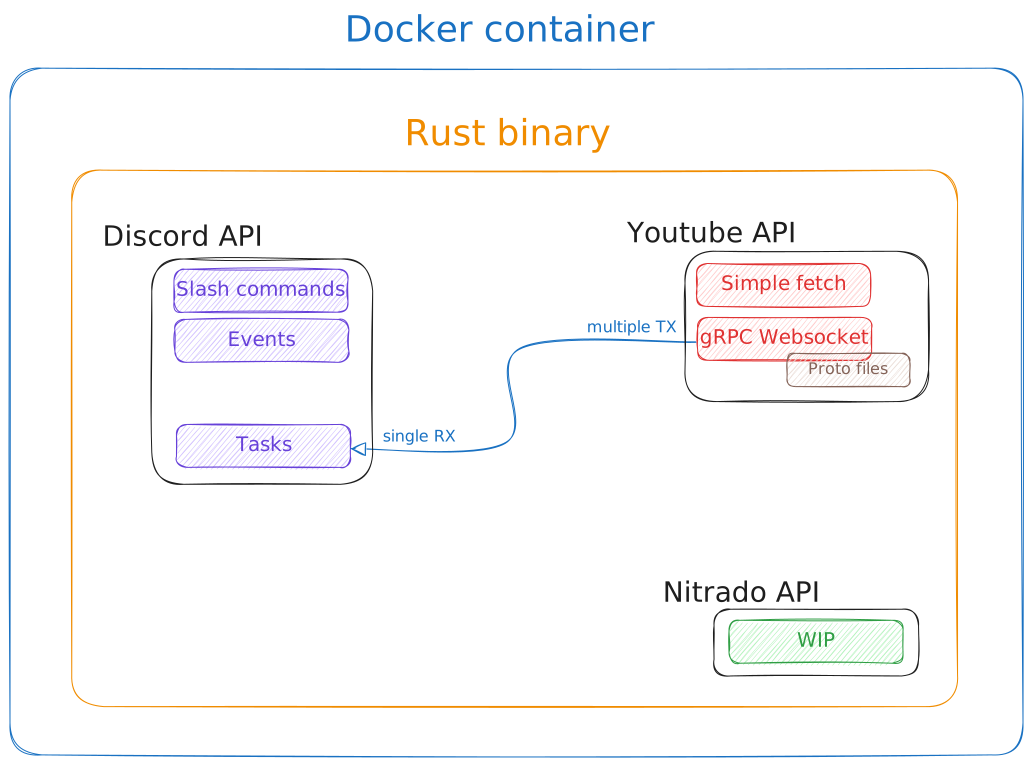
Cross Communication
Uses channels with Tokio mpsc
// use tokio::{task, time};
// use std::time::Duration;
use poise::serenity_prelude as serenity;
use tokio::sync::mpsc::Receiver;

mod ytb_clip;

pub enum Task {
    YoutubeClip {
        url: String,
        name: String,
        author: String,
    },
}

// CHANGE TIME TO MPSC (tokio)
// https://tokio.rs/tokio/tutorial/channels

// macro_rules! create_task {
//     ($fun:expr, $ctx:ident, $delay:literal) => {
//         let ctx2 = $ctx.clone();
//         let forever = task::spawn(async move {
//             let delay_ms = Duration::from_secs($delay);
//             let mut interval = time::interval(delay_ms);
//
//             loop {
//                 interval.tick().await;
//                 $fun(&ctx2).await;
//             }
//         });
//
//         tokio::task::spawn(forever);
//     };
// }

pub async fn start_tasks<'a>(_ctx: serenity::Context, mut rx: Receiver<Task>) {
    // create_task!(cluster_embeds::task, ctx, 60);

    while let Some(task) = rx.recv().await {
        match task {
            Task::YoutubeClip { url, name, author } => println!("RECEIVED"),
        }
    }
}